Lesson 3: Vim Ninja
By the end of today you will be able to open, change and save a file on any machine in the world, without a mouse and without installing anything.
It will feel slow for about a week. Then it will feel like cheating.
Warm up
Section titled “Warm up”If tldr gave you trouble, this is the version that works on WSL:
sudo apt install tealdeertldr --updateTwo questions from last time, neither of them a test:
- Did you get your script to run from anywhere, just by name?
- How is
pwgoing? Take your time with it. How far did you get, and is anything getting in the way?
Command of the day
Section titled “Command of the day”find walks a directory tree and prints what is in it.
find .Two worth keeping. Count the lines of every file below here:
find . -type f -exec wc -l {} +-type f means files only, not directories.
-exec ... {} + is the complicated part, and you do not need to understand it today. Worth knowing it exists, and worth noticing what it does: find gathers the files and hands them to a completely different command, wc, which knows nothing about find. Same idea as the pipe from last week, in a different shape.
And find only the images:
find . | grep -E '\.(jpg|png)$'grep -E reads a regular expression, a regex: a small language for describing the shape of text rather than the text itself. It turns up in editors, log searches, config files and half the tools you will ever use. Five symbols get you most of the way:
| Pattern | Means |
|---|---|
. |
any single character |
\. |
an actual full stop |
* |
zero or more of whatever came just before |
(jpg|png) |
either one |
$ |
the end of the line |
Two traps, and they are the ones everybody falls into.
The backslash matters. Without it, . matches any character at all, so photo-jpg and photojpg both match, and neither one is an image.
And * is not the * you type in the shell. In the shell, *.jpg means anything ending in .jpg. In a regex it means something else entirely: more of whatever came just before it.
regex101.com is where you test a pattern before you trust it. You type the pattern, paste in some text, and it shows you what matches while you type, with every symbol explained on the side.
Why vim
Section titled “Why vim”Today we find out why programmers whose AI writes half their code still use an editor whose keys were designed in 1976.
- It is on every machine you will ever log into. No install, no GUI, no exceptions
- The first time you touch a server or a container, it is the editor you have
- Use git from the terminal and it opens an editor for you, without asking first. Which editor depends on your settings, and vim is a common default
- Your hands never leave the keyboard. Reaching for the mouse costs about a second, and you do it hundreds of times a day
- Honest version: vim as it comes is not the best editor you can get, it is the one that is always there. A vim somebody has shaped to their own work over years is a different thing entirely, and that is why people stay with it
The speed is not really the point though. With a mouse you think in movements: select those characters, drag to there, delete. In vim you think in edits: delete this word, change what is inside these brackets, do that again to the next one. The keyboard stops being a way of typing letters and becomes a way of saying what you want done.
And it is not as old-fashioned as the date suggests. Autocomplete, split windows, two files side by side with the differences highlighted, all of it built in.
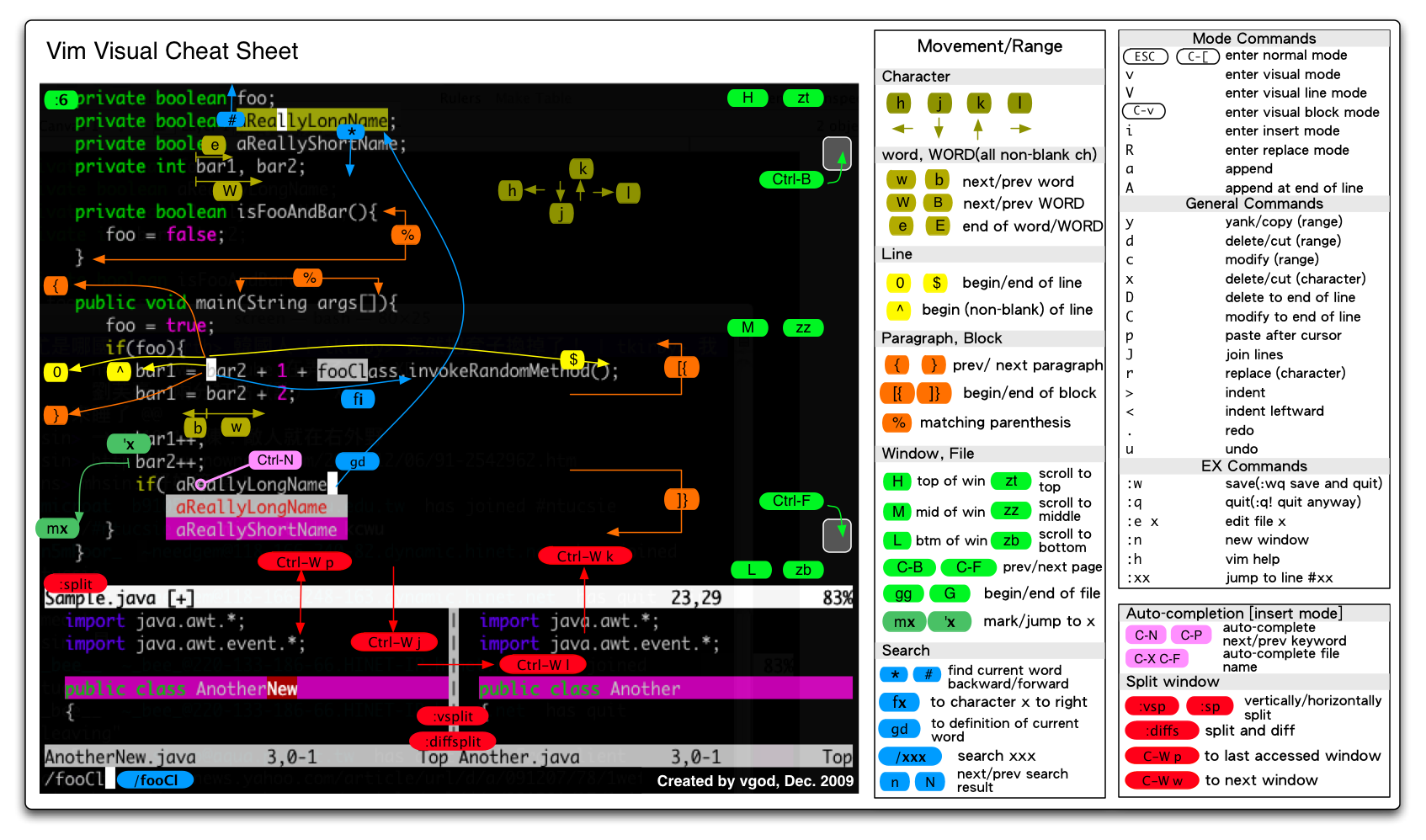
Almost everything it can do, on one page: the vim cheat sheet.
Getting out
Section titled “Getting out”
Esc first, always. Nothing else works until you have left insert mode.
| Command | What it does |
|---|---|
:q |
quit |
:q! |
quit, throw away changes |
:w |
save |
:wq |
save and quit |
ZZ |
save and quit, no colon |
ZQ |
quit and discard, no colon |
Challenge, two minutes. Open a file, type something, and leave without saving. Then do it again and save. Five times, until it is boring.
vim scratch.txt- Normal mode: the keys are commands. This is where you start and where you keep returning
- Insert mode: the keys are text.
ibefore the cursor,aafter it,oon a new line below - Command mode:
:for anything with a name
If you do not know which mode you are in, press Esc. That is the whole recovery procedure.
Challenge, two minutes. In normal mode, type the word hello and watch what happens. It is not a typo, it is five commands.
Moving
Section titled “Moving”| Key | Moves |
|---|---|
h j k l |
left, down, up, right |
w b |
forward and back by word |
0 $ |
start and end of the line |
gg G |
top and bottom of the file |
/word then n |
search, then next match |
:42 |
jump to line 42 |
fx then ; |
jump to the next x on this line, then the one after that |
4k 10j |
four lines up, ten lines down |
That last row is the important one. Any motion takes a number in front of it. w is one word forward, 5w is five. You do not learn new keys for it.
The arrow keys work. They just cost you the home row every time.
Changing things
Section titled “Changing things”| Command | Does |
|---|---|
x |
delete one character |
dd |
delete a line |
yy p |
copy a line, paste it |
u |
undo |
Ctrl + r |
redo |
Then the idea that makes vim worth learning: commands combine. d means delete and w means a word, so dw deletes a word. d$ deletes to the end of the line. 3dd deletes three lines.
You are not memorising a list. You are learning a grammar, and it lets you use commands nobody taught you.
Numbers work here too, and so does search and replace across the whole file:
| Command | Does |
|---|---|
d5w |
delete five words |
d10j |
delete this line and the ten below it |
:%s/old/new/g |
replace every old in the file with new |
In :%s/old/new/g, the % means the whole file and the g means every match on a line, not just the first. Leave the g off and see what changes.
Challenge, two minutes. Delete three lines with one command. Undo it. Redo it. Delete five words with one command. Then replace every the in the file with THE, and undo that too.
Macros
Section titled “Macros”Anything you can do with keys, you can record once and replay.
| Keys | What it does |
|---|---|
qa |
start recording into slot a |
q |
stop recording |
@a |
play it back |
9@a |
play it back nine more times |
Say fifty lines use single quotes and they should all use double quotes:
host = 'value-1'port = 'value-2'user = 'value-3'Do the first line by hand while recording. qa to start recording, 0 to the start of the line, f' to jump to the first quote, r" to replace it, f' again for the closing quote, r" again, j to drop down a line, q to stop.
Then 49@a, and the other forty-nine lines fix themselves.
Making it yours
Section titled “Making it yours”~/.vimrc is to vim what .bashrc is to bash: it runs every time vim starts. Three or four lines is plenty.
set numbersyntax onset tabstop=4Someone else’s config will not look like this. neovim, the newer version most people use now, is set up in lua, a real programming language, and those configs run to hundreds of lines across many files.
Not today: plugins, plugin managers, and somebody’s four hundred line config from GitHub.
If you want to enjoy it
Section titled “If you want to enjoy it”VIM Adventures turns the movement keys into an adventure game: you collect commands instead of learning them. The early levels are free and cover hjkl and basic motion, which is exactly the part you want to stop thinking about.
Go and have fun with it. An hour lost in that game will probably do more for you than an hour spent reading this page again.
One curiosity while you are here: type vimtutor in the terminal. It is a written tutorial that has shipped with vim for decades, and it opens inside vim itself.
Bonus Task
Section titled “Bonus Task”- Open your
pwtool in vim and make one change to it, without the mouse and without the arrow keys
When you have done that, stop and notice something: you just edited a file on a running operating system the same way engineers at Google, SpaceX and OpenAI do it. The actual thing, with the actual keys.